How to Self-Custody Bitcoin: A Step-by-Step Guide
Self-custody means you hold the private keys that control your bitcoin, instead of trusting an exchange, an app company or a broker to hold them for you. It is the main thing that makes bitcoin different from a bank balance: nobody can freeze your coins, delay your withdrawal or lend them out without your permission. It also means nobody can reset your password if you lose your backup. This guide walks through the whole process, step by step, from choosing a wallet to sending your first transaction safely.
You do not need to be technical. You need a wallet, a pen, about an hour, and the patience to test things with a small amount before you move everything. If you have not bought bitcoin yet, start with our guide on how to buy bitcoin and come back here before you build up a large balance on an exchange.
Why move bitcoin off an exchange
When you buy bitcoin on an exchange and leave it there, what you actually own is a claim against that company. The exchange holds the keys, and your account balance is a number in its database. Most of the time that works fine. The problem is what happens when it does not.
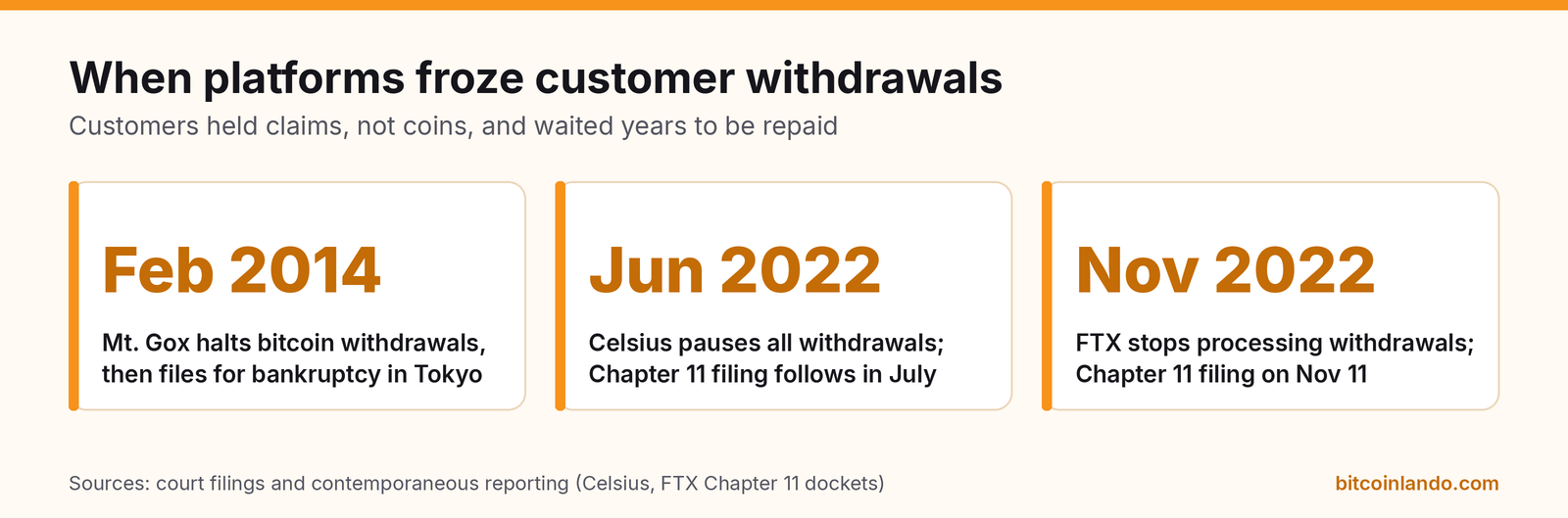
The history is short but clear:
- Mt. Gox (2014). Once the largest bitcoin exchange, it halted withdrawals in February 2014 and filed for bankruptcy in Tokyo later that month. Creditors waited about a decade for repayments to begin.
- Celsius (2022). The crypto lender paused all customer withdrawals on June 12, 2022 and filed for Chapter 11 bankruptcy in New York in July. Customers who had deposited bitcoin became creditors in a court process.
- FTX (2022). After a run on the exchange, FTX stopped processing withdrawals and filed for Chapter 11 on November 11, 2022, together with more than 100 affiliated companies.
In each case, customers who held their own keys were not affected. Customers who left coins on the platform had to wait for lawyers and courts. That is what people mean by counterparty risk: the risk that the company holding your asset fails, gets hacked, freezes your account, or simply has an outage when you need your money.
There are smaller everyday reasons as well. Exchanges can close accounts, change withdrawal limits, or require new identity checks before releasing funds. Self-custody removes those gatekeepers. The tradeoff is responsibility. If you are not ready to keep a backup safe, it is better to learn on a small amount first than to rush.
Step 1: Choose the right kind of wallet
A bitcoin wallet does not "store" coins. The coins live on the Bitcoin blockchain. The wallet stores the keys that let you spend them, and it shows you addresses for receiving. Wallets differ in where those keys are kept.
| Wallet type | Where the keys live | Best for | Examples in the directory |
|---|---|---|---|
| Mobile wallet | On your phone | Small amounts, everyday payments, learning | BlueWallet, Blockstream app, Phoenix |
| Desktop wallet | On your computer, or used as a coordinator for a hardware wallet | Managing savings with more control | Sparrow Wallet, Electrum, Bitcoin Core |
| Hardware wallet | On a dedicated offline device | Long-term savings | Coldcard, BitBox02, Blockstream Jade |
| Multisig wallet | Split across two or more devices or people | Large amounts, families, businesses | Nunchuk, Casa, Unchained |
A useful rule of thumb is to treat a phone wallet like the cash in your pocket and a hardware wallet like a safe. A phone is always online and runs many other apps, so it is a bigger target. A hardware wallet signs transactions inside a device that never exposes the keys to your computer. Our comparison of the best Bitcoin hardware wallets covers the devices in detail, and the best Bitcoin mobile wallets guide covers phone apps.
For most beginners, a sensible path is:
- Start with a reputable mobile wallet to learn how sending and receiving work.
- Buy a hardware wallet directly from the maker once your balance is more than you would be comfortable losing.
- Consider multisig when the amount is large enough that a single mistake or a single stolen backup would be life-changing. See our multisig guide.
Whichever you pick, prefer wallets that are open source, actively maintained and widely used. Browse the mobile wallet, hardware wallet and multisig sections of the directory to compare options.
Step 2: Create the wallet and write down the seed phrase
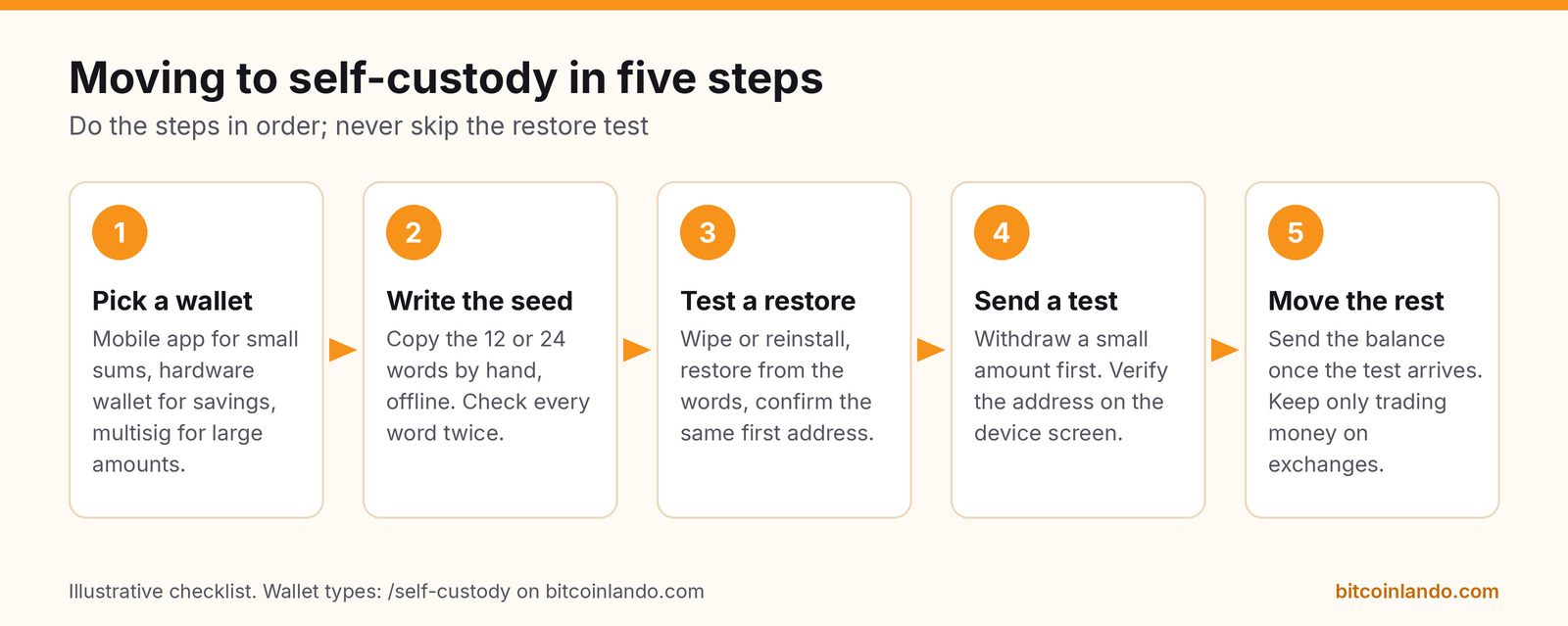
When you create a new wallet, it generates a recovery phrase, also called a seed phrase: usually 12 or 24 words from a fixed list of 2,048 words defined in the BIP-39 standard. Those words are a human-readable form of the master key. Anyone who has them can spend your bitcoin from any compatible wallet, anywhere in the world. If you lose your phone or your hardware wallet breaks, the words let you restore everything on a new device.
Follow these rules when you write it down:
- Generate it yourself, on the device. Never use a phrase that came printed in the box, was sent by "support", or was suggested by someone else. A pre-filled phrase is a scam, because whoever made it can take the funds.
- Write by hand, offline. Do not photograph it, type it into a notes app, email it to yourself, or save it in cloud storage. Those copies can be stolen remotely.
- Number the words and check the spelling. Every word is on the BIP-39 list. If something looks misspelled, check it against the screen again.
- Plan a durable copy. Paper burns and fades. A stainless steel or titanium plate survives house fires and floods far better. Our seed phrase backup guide compares metal products from the seed backup section.
Most wallets will ask you to confirm a few words before continuing. Treat that as the minimum, not the full test.
Step 3: Decide whether to add a passphrase
Many wallets let you add an optional passphrase, sometimes called a "25th word". Under BIP-39, the passphrase is mixed with the seed words to create the wallet's keys. A different passphrase, even one character different, produces a completely different, empty wallet. There is no "wrong passphrase" error, because every passphrase is valid.
That has two consequences:
- Protection: someone who finds your seed words cannot see or spend the funds without also knowing the passphrase.
- Risk: if you forget the passphrase, or misremember its capital letters or spacing, the funds are gone. Nobody can reset it.
A passphrase makes sense if you can store it reliably in a different place from the seed words, for example a written copy kept at a relative's house or in a separate safe. If you are just starting, it is fine to skip it and add it later by moving funds to a new passphrase-protected wallet. Do not keep the passphrase only in your head.
Step 4: Test the backup before you trust it
This is the step most people skip, and it is the step that catches mistakes while they are still harmless. Before you send any real amount:
- Write down the first receiving address the wallet shows you.
- Delete the wallet from the app (or reset the hardware wallet), then choose "restore" and type the seed words back in, plus the passphrase if you set one.
- Check that the restored wallet shows exactly the same first address. If it does, your backup is correct. If not, a word or the passphrase is wrong, and you just found out at no cost.
Some hardware wallets offer a built-in backup check, which you can use as well. The point is to prove, with your own eyes, that the written backup alone can rebuild the wallet.
Step 5: Receive a small test transaction
Now withdraw a small amount from your exchange to the new wallet. A good test amount is large enough to be worth a network fee but small enough that a mistake would not hurt.
- Copy the address from the wallet, not from a message or old screenshot. Use a fresh receiving address each time.
- On a hardware wallet, confirm the address on the device screen. Malware on a computer can swap the address on your screen for an attacker's. The device screen is the one you can trust.
- Compare more than the first few characters. Check the start, the middle and the end of the address when you paste it into the exchange.
- Wait for confirmation. An on-chain transaction usually confirms within an hour, often much faster. You can look up the transaction on a block explorer such as mempool.space.
When the test arrives, try sending a small amount back out, for example to a second address in the same wallet. Then you know both directions work. After that, move the rest of your balance. Keep only what you actively trade on the exchange.
Sending bitcoin safely
Bitcoin transactions cannot be reversed. A few habits prevent almost every sending mistake:
- Get the address directly from the recipient's wallet or invoice. Scammers send fake "updated" addresses by email or chat. If someone changes payment details, confirm through another channel.
- Use QR codes where possible instead of retyping, and check the result.
- Choose a sensible fee. The fee depends on transaction size and network demand, not on the amount sent. Your wallet will suggest a fee rate in sats per virtual byte. On November 8, 2026, mempool.space showed recommended rates of just 1 sat/vB, but rates can rise sharply when the network is busy.
- Know about Replace-By-Fee. Many wallets let you "bump" the fee on a stuck transaction. It is a useful option to have switched on.
- Use Lightning for small, fast payments. For coffee-sized amounts, a Lightning wallet is cheaper and faster than an on-chain transaction. Our Lightning Network guide explains how it works.
Privacy basics: stop reusing addresses
The Bitcoin blockchain is public. Anyone can see every transaction to and from an address. If you post one address publicly and reuse it for every payment, anyone who knows it is yours can see your full history and balance through that address. The project guidance on bitcoin.org recommends using a new address for each payment for this reason.
Modern wallets make this automatic: each time you tap "receive", you get a new address, and all of them belong to the same wallet and recovery phrase. A few more habits help:
- Label incoming coins (for example "exchange withdrawal" or "salary"). Wallets with coin control, such as Sparrow, let you choose which coins to spend, so you do not mix coins from sources you would rather keep separate.
- Remember that exchanges know your withdrawal address. If you completed identity checks, the exchange can link your name to the coins it sent you.
- Consider your own node. By default, most wallets ask someone else's server about your addresses and balances. Connecting your wallet to your own node keeps that information at home. See our guide on how to run a Bitcoin node and the node section of the directory.
Where to store your backups
A backup protects against loss only if it survives the same events that destroy your device, and it protects against theft only if a thief cannot easily find it. Balance these points:
- Do not keep the only backup next to the device. A fire or burglary could take both.
- Two copies in two places is a common choice, for example one at home in a hidden or locked spot and one at a trusted family member's house or in a safe deposit box. Each extra copy is another place it can be found, so do not overdo it.
- Keep seed words and passphrase apart if you use a passphrase.
- Write instructions for your family. If something happens to you, your heirs need to know the bitcoin exists and how to get help, without the letter itself giving away the keys. Our Bitcoin inheritance planning guide covers this.
Common mistakes to avoid
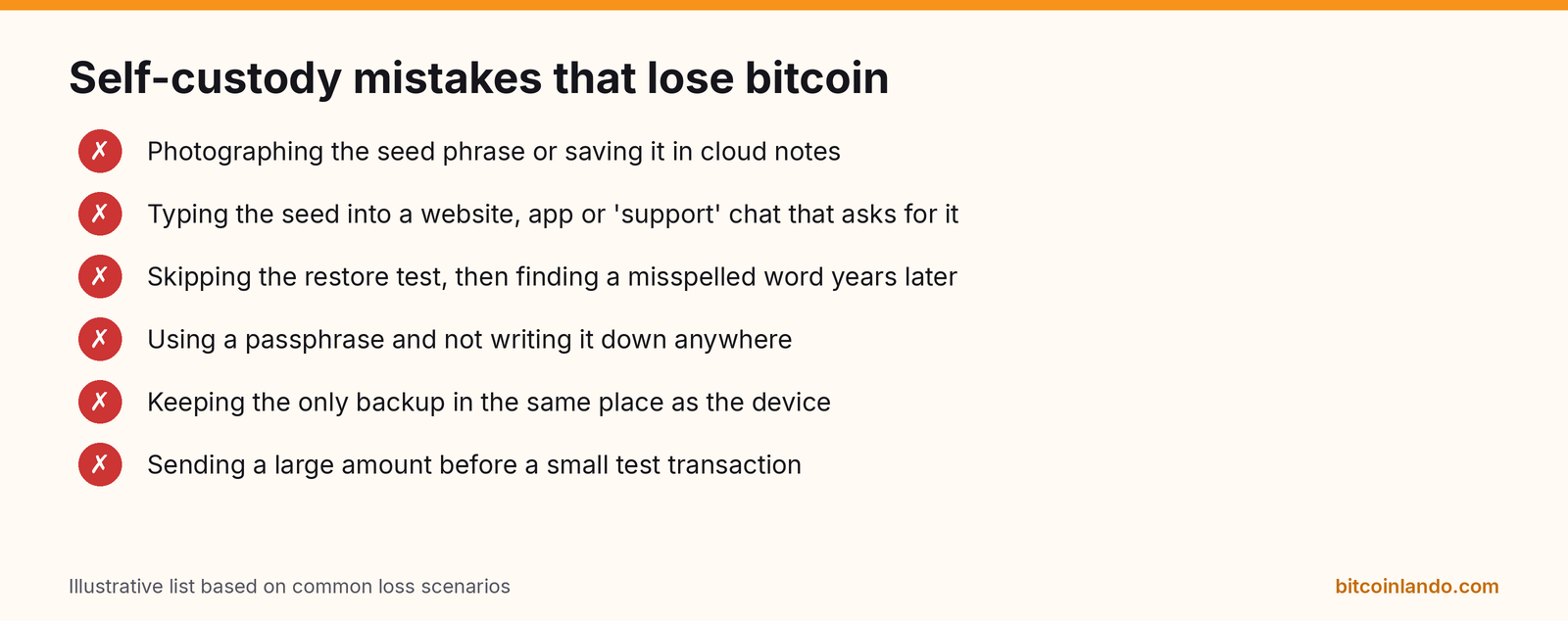
- Entering the seed phrase anywhere online. No legitimate wallet maker, exchange or support agent will ever ask for your recovery phrase. Any website or message that asks for it is a scam. Our guide to avoiding bitcoin scams lists the common tricks.
- Buying a hardware wallet from a marketplace reseller. Buy from the manufacturer or an authorized reseller, and check the device's authenticity on first setup.
- Trusting fake wallet apps. Search results and app stores sometimes host lookalike apps. Download from the link on the project's official website.
- Losing track of the passphrase. A forgotten passphrase is as final as a lost seed.
- Never testing. A backup you have not restored from is a backup you hope works.
- Talking about holdings. Keep quiet about how much you hold, online and offline.
- Ignoring updates. Keep wallet apps and hardware wallet firmware current, from official sources only.
A sensible setup by balance
There is no single right answer, but here is a reasonable progression:
- Small amounts you spend: a mobile wallet, with the seed written down and tested. A Lightning wallet for payments.
- Savings: a hardware wallet paired with a desktop or mobile app such as Sparrow, Nunchuk or the maker's own app, with a metal backup in a separate location.
- Large or family savings: a 2-of-3 multisig, either do-it-yourself with tools like Liana, Nunchuk or Bitcoin Keeper, or with an assisted service such as Casa or Unchained that holds one backup key but cannot spend alone.
If you buy regularly, a routine of buying on an exchange and withdrawing to your own wallet once a month (or whenever the amount is worth the fee) keeps exchange exposure low. Our dollar-cost averaging guide covers services that can do this automatically.
Frequently asked questions
Is self-custody safer than leaving bitcoin on an exchange?
It removes the risk of the exchange failing, freezing your account or being hacked. It adds the risk of you losing your backup or being tricked into revealing it. For most people who follow the steps above, including the restore test and a durable backup, self-custody is the safer long-term choice. If you are not ready yet, keep only small amounts in your own wallet while you practice.
What happens if my phone or hardware wallet breaks?
Nothing is lost as long as you have the recovery phrase (and passphrase, if you set one). Install the same or another compatible wallet, choose "restore", and enter the words. Your balance will reappear because the coins were always on the blockchain, not on the device.
Should I use a 12-word or 24-word seed?
Both are secure. A 12-word phrase encodes 128 bits of randomness and a 24-word phrase encodes 256 bits, according to BIP-39. Twelve words are already far beyond what anyone can guess. Use whatever your wallet generates, and focus on storing it well.
Do I have to pay taxes when I move bitcoin to my own wallet?
In the US, moving bitcoin between wallets you own is generally not a taxable sale, but you should keep records showing that both the exchange account and the wallet are yours. Rules differ by country. See our Bitcoin taxes guide for an overview; it is not tax advice.
Can someone steal my bitcoin if they know my address?
No. An address is for receiving. Knowing it lets someone send you coins and see that address's history, but not spend from it. Only the private keys, which come from your seed phrase, can spend.
The short version
Pick a reputable wallet, write the seed phrase by hand, restore from it once to prove it works, send a small test, then move the rest. Keep the backup safe and offline, never type it into a website, and use a new address for each payment. Once that routine feels natural, you can upgrade to a hardware wallet or multisig as your savings grow. The self-custody sections of the Bitcoin Lando directory list the tools to do it.
Featured in this article
 Sparrow Wallet · Free, open-source, self-custodial desktop Bitcoin wallet focused on security and privacy with hardware-wallet and PSBT support.
 BlueWallet · Open-source, self-custodial mobile Bitcoin wallet with built-in Lightning Network support.
 Coldcard · Bitcoin-only, open-source air-gapped hardware wallet by Coinkite with dual secure elements.
 BitBox02 · Swiss-made open-source hardware wallet by BitBox; sold in Bitcoin-only and multi-coin editions.
 Blockstream Jade · Fully open-source hardware wallet by Blockstream for Bitcoin and Liquid, with air-gapped QR signing.
 Nunchuk · Open-source, self-custodial multisig Bitcoin wallet for advanced security and inheritance, with Lightning integration.
 Phoenix · Self-custodial, open-source Lightning Network mobile wallet by ACINQ.
 Casa · Self-custodial multisig collaborative-custody service for Bitcoin with key-management and inheritance tools.
Related articles
-
Best Bitcoin Hardware Wallets (2026): Coldcard, BitBox, Jade and More
A side-by-side comparison of the Bitcoin hardware wallets in the Bitcoin Lando directory, covering security design, connectivity, backups and November 2026 list prices, plus a safe setup checklist.
-
Stablecoins vs Bitcoin: What They Are and How They Differ
A plain guide to stablecoins: how fiat-backed, crypto-backed and algorithmic designs work, what can go wrong, and how they compare with bitcoin on issuer risk, fixed supply, custody, fees and purpose.
-
How to Buy Bitcoin in 2026: A Beginner's Guide
A plain-English guide to buying bitcoin through exchanges, Bitcoin-only apps, ATMs and peer-to-peer marketplaces. Covers real costs, identity checks, ATM scams and withdrawing to self-custody.